Med Spa Software Comparison: Booking, Clinical Records, Payments and Switching Costs
The best med spa software for your practice is the system your team can use to deliver a complete visit accurately, keep track of money and treatment obligations, and retrieve the records it needs. A polished booking screen is helpful. It is only the beginning of the work.
This guide compares several platforms worth investigating, explains their published pricing where available and gives you a patient journey to test during a demo. It also shows how payment processing, staff time and migration can change an apparently inexpensive subscription. We have reviewed published documentation; we have not conducted hands-on product testing or awarded a universal winner.
Build and save my software worksheet ↗Med spa software at a glance
Solo injector or a small startup
Fast, accurate charting; straightforward booking and checkout; package balances; usable support; and a total bill you can afford at low volume
Several clinicians and a front-desk team
Permissions, room and device scheduling, record handoffs, inventory controls, signed documentation and reports that reconcile
Dermatology or plastic-surgery practice
Compatibility with the clinical, billing, laboratory and surgical workflows you actually need; aesthetic booking alone may not cover them
Multiple locations
Location permissions, shared patient records where appropriate, stock transfers, package redemption, consolidated reporting and a practical migration plan
By NuWays MD · Professional planning guide · Sources and calculations checked September 22, 2026
Which med spa software platforms should you compare?
Use these as starting points for demonstrations, not automatic purchase recommendations. The “consider it when” column is our editorial judgment about which published features deserve investigation. It is not a claim that every feature works equally well or is included in every tier.
| Platform | Why it belongs in the discussion | Consider it when | What your demo needs to prove |
|---|---|---|---|
| Aesthetic Record | Aesthetic-focused clinical documentation, photographs and practice operations, with published per-user pricing | You want to investigate a relatively low published subscription starting point and aesthetic workflows together | Your chart and photo workflow, package handling, stock usage, included allowances and which useful features cost extra |
| Boulevard | Booking, client management and payments, with a dedicated Medspa offering and clinical add-on documentation | Front-desk workflow and the patient-facing experience are important parts of the decision | Exact clinical scope, permissions, signed records, unit or package tracking, tier requirements and the complete Medspa quote |
| Mangomint | Scheduling and operations alongside forms, charting and image-annotation features described by the vendor | You want to evaluate an integrated booking-to-checkout workflow with a published location-plus-user price | Clinical review and sign-off, photo access, package balances, inventory detail and the price of communications or other add-ons |
| PatientNow | Aesthetic practice software with distinct offerings for cash-pay and more medically complex workflows | You need to investigate an EMR and operating system in the context of a broader medical practice | Your specialty’s documentation, labs or billing needs, migration scope, integrations and what the quoted tier includes |
| Zenoti | A broad platform covering scheduling, memberships, inventory and multi-location operations | The practice has a managed team or several locations and needs consistent operational reporting | Staff and location permissions, shared balances, clinical workflow, reporting exports, implementation ownership and consumption charges |
Published product and pricing sources: Aesthetic Record, Boulevard, Mangomint, PatientNow and Zenoti. Checked September 22, 2026. Product descriptions are vendor claims until you verify the functions relevant to your practice.
A business-support program that includes software, marketing, coaching or medical-director services needs a different comparison. Separate the software cost and access rights from the accompanying services. Otherwise, a bundled monthly fee can look expensive or inexpensive without telling you which obligations you are actually buying.
What does med spa software cost?
The published subscription is one line in the total. Add mandatory payment arrangements, implementation, communications, prescribing or other modules, hardware, additional locations and the staff time needed to get started. Obtain a written quote for your intended team and workflow.
| Published observation | A comparable small-team example | What is still outside that example |
|---|---|---|
| Aesthetic Record Essentials: $15 per user per month; $399 startup fee | Three users: $45 monthly; $939 first-year base total including the startup fee | Payment fees, applicable add-ons, usage beyond allowances, hardware and your implementation labor |
| Aesthetic Record Accelerator: $19 per user per month; $399 startup fee | Three users: $57 monthly; $1,083 first-year base total including the startup fee | The same need to verify the complete configuration and usage costs |
| Mangomint: $120 per location per month plus $10 per user per month | One location and three users: $150 monthly, or $1,800 over 12 months before other costs | Payment fees, optional services and your transition costs |
| Boulevard Medspa | Obtain a written Medspa proposal | Do not substitute a salon offer or a promotional headline without matching scope and billing terms |
| PatientNow and Zenoti | Obtain a written proposal for the relevant products and locations | Implementation, integrations, communications, payments and other usage or service charges need explicit answers |
These are dated US-dollar observations, not fixed quotes or a quality ranking. The Aesthetic Record examples apply the listed startup fee once. Mangomint announced its new location-plus-user structure effective August 1, 2026, so an older article quoting its former tiers may no longer describe a new customer’s offer. Mangomint pricing update
Boulevard’s published Medspa add-on documentation is useful for checking clinical scope, but an add-on price alone is not the price of a complete operating system. For any vendor, have the rep label the quote required, optional, usage-based and not included.
Follow one fictional patient through the demo
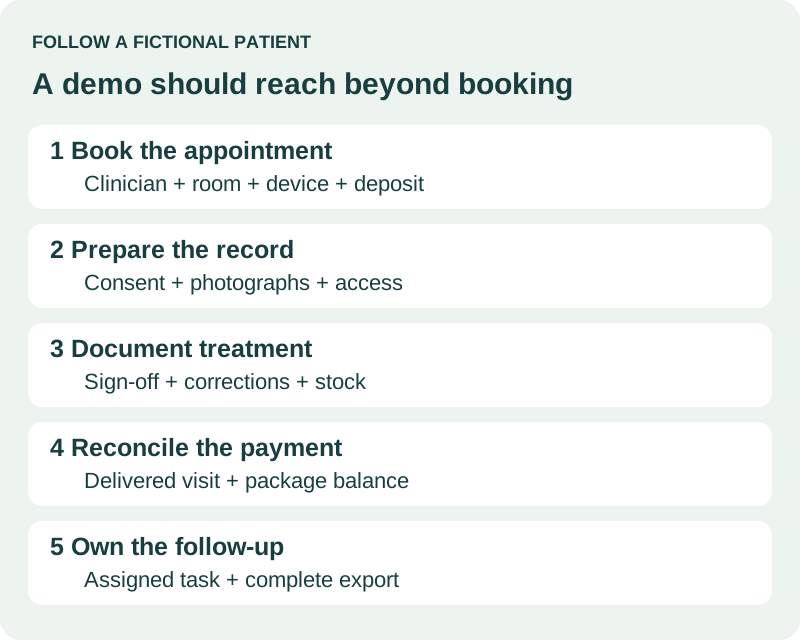
Tell the representative you want to work through an ordinary visit with a made-up patient, “Alex.” Use invented details and demonstration photographs, not a real patient’s information in an unapproved test account. The exercise should follow the person from booking to follow-up, including a few problems that occur in real practices.
1. Booking, deposits and the right resources
Alex selects a service online. Can the system offer the right clinician, room and device without creating an impossible appointment? Show what happens if Alex is a new patient who needs a consultation first, reschedules after paying a deposit or accidentally creates a duplicate profile.
Have the front-desk person perform the change. Note whether the deposit stays attached to the right appointment, what the patient receives and how another staff member can understand the change later. A reminder being “sent” does not prove it reached the person or that an unanswered reply has an owner.
2. Consent, photographs and clinical review
Complete the relevant forms, record their version and signature, and show how the clinician reviews them before treatment. Then change a form and demonstrate that the original signed version remains identifiable.
Take or attach a demonstration photograph. Verify access restrictions, date and treatment association, comparison views and how the original is exported. Consent to treatment and permission to use photographs in marketing are separate decisions. The software should help the team see what the person agreed to rather than encourage one broad checkbox for everything.
3. Documentation, stock and a corrected entry
Document a fictional treatment, identify who performed it and show the review or sign-off workflow the practice needs. Then correct an error. Who can amend the record, and can you see who changed what and when? A system that simply overwrites a completed chart may not meet your recordkeeping needs.
For injectables, demonstrate the unit used for buying stock, the unit used for treating and billing, and how partial use and waste are recorded. For devices, show any disposable or credit tracking you require. Do not assume a generic product inventory feature handles lot numbers, expiry or your exact clinical workflow.
4. Checkout and visits still owed
Alex buys three treatments and completes one. Show the money collected, visit delivered and two remaining visits. Then demonstrate a partial refund, a price adjustment and redemption with another eligible clinician or location.
The report should distinguish money collected today from work the team still owes. Check how deposits, gift cards, memberships and treatment packages differ in the system. Ask your accountant which exports are needed to reconcile them; a single “sales” total can hide important differences.
5. Follow-up, handoffs and departure
Create a follow-up task, assign it and show what happens when the assigned person is absent. Use your clinical team’s escalation rules for treatment concerns. This test is about ownership and visibility, not having software decide how to handle a clinical symptom.
Finally, export Alex’s demonstration record. Open the export and look for forms, signed documents, images, notes and relevant dates. A spreadsheet containing names and emails is a contact export, not a complete clinical-record migration.
How should you score a software demo?
Use four simple results: demonstrated, needs configuration, not demonstrated and does not meet our need. Record the exact task and who will resolve it. Avoid awarding a high overall score to a system that fails a requirement the practice cannot compromise on.
| Requirement type | Example | How to treat it |
|---|---|---|
| Must work before launch | Appropriate record access, required clinical documentation, accurate outstanding package balances | A failed or unproven requirement needs resolution before commitment |
| Important workflow | Booking a clinician, room and device together; refunds; stock reconciliation | Measure the number of steps, error opportunities and role handoffs |
| Useful convenience | Preferred dashboard appearance or an optional marketing feature | Compare after the necessary clinical and operating requirements are satisfied |
The AHRQ workflow-mapping approach supports documenting how work actually moves through a practice before changing its technology. Our demo sequence is an original example applying that principle to an aesthetic practice. It is not a validated product score or hands-on performance study.
When can payment processing outweigh the subscription?
Here is a fictional cost comparison unrelated to any named vendor. Both systems are assumed to handle the same transactions, with no additional fees beyond those shown. Real proposals can have different card-present, online, keyed, refund or other charges.
| Monthly cost item | System A | System B |
|---|---|---|
| Software and selected recurring add-ons | $300 | $500 |
| Processing assumption | 2.9% + $0.30 per transaction | 2.5% + $0.10 per transaction |
| Processed volume | $80,000 | $80,000 |
| Number of transactions | 200 | 200 |
| Percentage fees | $2,320 | $2,000 |
| Per-transaction fees | $60 | $20 |
| Modeled monthly total | $2,680 | $2,520 |
| One-time implementation cost | $1,200 | $2,400 |
| Modeled first-year total | $33,360 | $32,640 |
System B’s higher subscription is outweighed by lower processing costs at this volume. Its first-year advantage is $720 after the different implementation costs. At $20,000 processed through 50 monthly transactions, A totals $895 a month and B $1,005, so A is $110 cheaper per month before one-time costs.
The point is to use your own expected volume and transaction count. A startup and a busy clinic can reach different conclusions from the same fee schedules. Include staff migration time, training, hardware and an overlap period with the old system before calling the cheaper subscription the cheaper change.
Your software costs and demo checklist
Use the example to understand the calculation, then start with your own figures. All money is in US dollars.
Calculate to see the breakdown.
Keep the figures and the next steps together
Save this editable worksheet, track the five preparation steps and download a copy. Return through your private practice workspace. No email delivery, marketing enrollment or vendor introduction is included.
What should you check in the payment and subscription terms?
- Payment choice: is the advertised plan conditional on using the vendor’s processor, and what changes if you use another one?
- Transaction types: what rates apply to in-person, online, keyed, stored-card and recurring membership payments?
- Refunds and disputes: are original fees returned, are dispute fees charged and who handles the evidence?
- Timing: how are payouts, reserves, chargebacks and payment failures shown and reconciled?
- Commitment: what is the minimum term, renewal process, cancellation notice and cost of leaving?
- Usage: what counts toward messages, storage, users, locations or optional features, and how are overages billed?
If the rep says a cost is included, keep that statement in the written proposal. A useful annual comparison includes the first implementation year and a separate ongoing year, because migration costs and promotional discounts can distort the first impression.
How do you switch systems without losing records or balances?
Make an inventory before setting a go-live date. Contacts are only one part of it. List clinical notes, signed consents, photographs, upcoming appointments, deposits, package visits, memberships, gift cards, inventory and financial reports. Assign an owner to each category.
A practical migration sequence
- Map the data. Identify the old field, destination field, file format and what will remain in an archive rather than the new system.
- Test a sample. Include a simple record and complicated examples with amended notes, several photographs, a refund and an outstanding package. Use an approved, appropriately protected migration process.
- Reconcile the totals. Compare opening package obligations, deposits and other balances with the old system. Investigate differences before taking new transactions.
- Train each role. Front desk, clinical staff, managers and owners should rehearse the work they will actually perform.
- Plan the cutover. Decide which system owns new bookings and payments, how duplicate entries are prevented and who resolves a problem on launch day.
- Retain a recovery route. Confirm lawful record retention, archive access and a backup before terminating access to the old system. Keep export and retention decisions with the appropriate clinical, privacy and legal advisers.
Budget for paid staff time and possible subscription overlap. “Free migration” needs a written scope: which files, how many years, which balances, what exclusions and what correction support? It does not automatically mean every part of your practice history will arrive ready to use.
What does HIPAA-ready software actually mean for an owner?
First establish which privacy and security obligations apply to your practice. For a HIPAA covered entity or business associate using a cloud service that handles electronic protected health information, the appropriate business associate agreement is part of the requirement; selecting software does not complete the practice’s own compliance responsibilities. HHS cloud-computing guidance
In the demonstration, check individual accounts, role permissions, multifactor authentication, audit information, staff offboarding and export or return of records. Put responsibility for these tasks in the operating plan. A vendor’s compliance statement is useful evidence to investigate, not a reason to let everyone share one administrator login.
Do not upload patient records, identifiable clinical details or photographs into the NuWays MD planning tool. It is for business assumptions and demo questions, not a clinical record system.
What should a solo owner prioritize differently from a managed team?
A solo owner often switches between providing treatment, answering messages and taking payment. Count interruptions and duplicate entry. A system that reduces those steps may be worth more than a large feature list, provided it handles the necessary clinical documentation and money accurately.
With a team, focus on handoffs. Can a receptionist see enough to book correctly without unnecessary clinical access? Can the next clinician understand a signed record? Can a manager reconcile stock and packages without changing clinical documentation? Those questions become more important as responsibilities separate.
For a dermatology or plastic-surgery practice, map required medical billing, laboratory, surgical or existing EHR workflows first. A cash-pay aesthetic platform may support part of the patient journey without replacing everything the practice already needs. Include the cost and reliability of that integration in the comparison.
Save my software costs and demo questions
Keep your own figures, preparation progress and open questions in one private practice worksheet.
Open my worksheet and save ↗Frequently asked questions
Which platform is the cheapest?
The lowest published base subscription in this selected table is not necessarily your lowest total cost. Compare the exact plan, users, locations, required add-ons and payment volume, then include migration and staff time. The worked example shows how the result can reverse at different volumes.
Should a startup choose an all-in-one system?
An integrated system can reduce duplicate work. It still needs to perform the tasks you cannot compromise on. A combination of tools may be workable if responsibility for transferring records, permissions and reconciliation is clear. Count those ongoing handoffs as real work.
Is “unlimited users” automatically better than per-user pricing?
Only in the context of the complete bill and the team that needs access. Confirm what counts as a user and whether clinical, administrative or limited-access roles cost differently. Never share a login to reduce user charges.
Can I move credit cards and recurring memberships?
Do not assume stored payment credentials transfer. Ask both providers what is technically and contractually possible, which party manages the transition and whether patients must authorize a new arrangement. Test failed payments and cancellation handling before moving every member.
Should I migrate everything into the new system?
Not necessarily. Some older records may remain in a compliant, accessible archive if the clinical and retention requirements allow it. The critical points are completeness, reliable access and a documented plan. A smaller import should not become an excuse to lose records or prepaid obligations.
What should I ask for before signing?
A configured demonstration, a complete written cost proposal, contract and payment terms, a data-export example, a migration scope and an implementation owner. Keep unresolved requirements attached to your decision rather than relying on memory after a persuasive demo.
Sources and how the comparison was prepared
Vendor features and price observations were checked September 22, 2026 using the linked official pages. Additional references include Mangomint’s forms features, PatientNow’s platform questions, Zenoti’s med spa offering and HHS business associate provisions. Features, prices and terms can change; a configured written proposal is the basis for a purchase.
The patient journey, cost comparison and evaluation method are original fictional planning examples. NuWays MD has not performed hands-on testing of these systems and has no active software referral agreements represented here. Saving a worksheet does not authorize vendor sharing or enroll you in marketing. Read our editorial and commercial standards, then use capacity planning to examine the workflow you want the software to support.